
How to Compare AI Crypto Trading Bot Options Before You Invest
An AI crypto trading bot is software that uses artificial intelligence and machine learning to study market data and make or place trades. Depending on the product, it may read prices, past data, order-book changes, and news mood, then send buy or sell orders through an exchange API. This can save attention and remove some emotional choices. It does not make the market safer or promise profit. I start by matching a bot to a strategy I understand, the exchanges I use, and a loss limit I can afford.

Rule-Based, Adaptive, and Hybrid AI Trading Bots
The word AI covers very different products. A fixed-rule bot may buy when an asset falls 5% and sell when it rises 10%. An adaptive model may study many inputs and change its choice as market data changes. Some products call a template, rule set, or assistant AI-powered even when the core trader is not a machine learning system. I would ask each provider what runs the order, what the model changes, and what stays fixed.
Common bot models
- Fixed-rule bot: It follows set conditions, such as buying after a 5% fall or selling after a 10% rise.
- Adaptive AI trader: It uses models to study several inputs and may change its choice as new data arrives.
- AI assistant: It suggests balances, settings, or trades while the main bot still runs fixed strategies.
- Scheduled AI agent: It performs set tasks at set times, such as research, order placement, and record keeping.
- Hybrid bot: It uses fixed rules for order execution and AI for research, sentiment checks, or parameter selection.
A genuine autonomous AI trader, a rule-based bot with an AI assistant, and a scheduled AI agent that follows explicit instructions are different products with different risks and capabilities.
An adaptive model may react to a wider set of data, yet its choice can be harder to explain. Adaptation is not guaranteed, and a model trained on one type of market can fail when volatility or liquidity changes. I want plain docs that explain what data enters the system, what rules control order size, how trades close, and what happens when an exchange or data feed fails.
Trading Strategies and Bot Types
The bot type should match the job you want it to do. A tool that spreads purchases over time solves a different problem from one that hunts price gaps across exchanges. Here are the main choices described in the source material, along with the catch that can catch a new trader.
Common crypto bot strategies
- Dollar-cost averaging: It buys a fixed amount at set times. This can spread entry points, but it may keep buying during a long fall.
- Grid bot: It places orders within a price range. It can suit a sideways market but may stop working when price leaves that range.
- Arbitrage bot: It looks for price gaps across exchanges. Fees, speed, liquidity, and transfer delays can erase the gap.
- Market-making bot: It tries to earn the spread between the bid and ask. Inventory can build on one side and create extra exposure.
- Scalping bot: It makes many quick, small trades. Spread, slippage, and fees matter more as trade speed rises.
- Buy-the-dip bot: It buys after a drop under set rules. The decline size, proof of recovery, stop, and exit need clear limits.
- Signal, mean-reversion, and breakout bots: They follow signals or price patterns. Each needs rules for invalid signals, duplicate orders, and position size.
If your real question is which crypto to buy , that is a separate choice. A coin list or coin market app can help you gather candidates, but it does not test a grid range, DCA horizon, or bot drawdown. Calling an asset large-cap crypto does not settle the strategy question either. The bot runs the plan; it does not make the asset plan sound.
Six Prebuilt AI Crypto Trading Bot Choices
The source set covers six broad choices rather than a single ranking. They differ in strategy depth, exchange links, user control, and the work needed after setup. When I see a top platform list , I want the fit behind the name. These crypto bots also do not all use AI in the same way.
Platform choices at a glance
- 3Commas: Deep settings, several bot types, TradingView signals, and order routing make it a fit for control-focused users.
- Bitsgap: Spot, futures, grid, DCA, buy-the-dip, backtesting, and an AI setup assistant cover many common needs.
- Coinrule: Templates and drag-and-drop rules suit people who do not want to write code.
- CryptoHopper: Copy trading, social trading, DCA, backtesting, and custom strategies put more emphasis on copied moves.
- Pionex: An exchange and bot service in one place can keep setup simple for traders who use that ecosystem.
- TradeSanta: Prebuilt DCA and grid tools, a clean screen, and TradingView signals suit simpler setup.
3Commas for Deeper Trading Control
The source presents 3Commas as a feature-rich option for advanced and multi-exchange users. Its listed tools include SignalBot with TradingView, DCA, grid trading, mean reversion, scalping, breakouts, and SmartTrade order routing. That range is useful if you want more than one strategy, but it can also mean more settings to learn. I would check the exchange list, order types, key permissions, and incident history before choosing it. The review also described a developing AI bot, so I would not treat that planned item as a working reason to pick the platform.
Bitsgap for Strategy Choice and AI Setup Help
Bitsgap offers spot and futures bots, grid and DCA strategies, buy-the-dip tools, demo mode, and backtesting. Its AI Assistant studies a crypto balance and suggests portfolio balances and grid settings across pairs and exchanges. The source describes short, medium, and long setup choices, plus a backtest chart for reviewing the suggestion. That makes the assistant useful for planning, but it is not a fully autonomous machine learning trader. You still make the final choice, manage the bots, and set the risk rules.
Coinrule for No-Code Bot Setup
Coinrule is built for people who want to test crypto and stock bots without writing code. It offers ready-made templates, drag-and-drop rules, exchange connections, and bots described as agentic. It also lists on-chain bots for ecosystems such as Ethereum and Base. This can remove an early wall for a beginner, but the setup screen does not teach you why a strategy works or when it fails. I would use a template to learn the process, then read every entry, exit, fee, and permission setting before risking money.
CryptoHopper for Social and Copy Trading
CryptoHopper puts social trading and copy trading near the center of the product. It also offers DCA, backtesting, paper trading, and custom strategies for users who need more control. That mix can help a new trader follow another strategy before building one, but copied performance is not the same as understanding the risk. A copied bot can hold the wrong asset, use poor exits, or fail when liquidity changes. I would check who controls the account, which permissions the copy uses, and what happens when the followed trader stops or rolls over a loss.
Pionex for Bots Inside an Exchange
Pionex combines an exchange with its own bot service, so traders can run supported strategies within that exchange setup. The source lists DCA, grid, leveraged or margin grid, copy trading, futures, and spot tools. This can be a simple choice if you already trade there and want bot access without another subscription. Trading fees, spread, slippage, and losses still apply. It may also fit less well if your strategy needs deep connections to several outside exchanges or price comparison across many venues.
TradeSanta for Simple DCA and Grid Setups
TradeSanta focuses on a clean screen, prebuilt templates, and one-click DCA and grid setup. The source also lists TradingView screener signals, spot and futures markets, a trading terminal, and support for a wide coin list. It is worth a close look if you want a guided setup rather than custom code. The easy part starts the bot; it does not choose the range, order size, exit, or stop for you. I would compare those settings and the fee page before treating the simple setup as the right fit.
API Keys and Account Security
Connecting a bot to an exchange is an account security choice, not just a setup step. The key may let the provider place trades, read data, or reach other account functions based on the permissions you grant. A stolen or exposed key can create losses even when the strategy itself is sound. This one deserves real care, so I would read the permission page and exchange guide before adding funds.
API security checks
- Use a trade-only key when the bot does not need transfers or withdrawals.
- Turn off withdrawal access unless there is a clear reason to grant it.
- Use IP whitelisting when the provider and exchange support it.
- Keep paper-trading credentials separate from live-trading credentials.
- Store keys in protected environment variables rather than source files or shared notes.
- Check encryption, key storage, staff access, and incident history on both sides.
- Confirm whether the connection can read data, trade, transfer assets, or sign wallet actions.
- Check the exchange's own security controls, regional limits, and account protections too.
A bot that does not need withdrawal access should not be granted it unnecessarily.
I would begin with the least access that can run the strategy, then add more only when a real feature needs it. If the bot connects to a self-custodial wallet, the wallet signing and transfer permissions deserve the same close look. A clean interface does not make a provider safe. The key rules still live on the exchange and the provider's servers.
Backtesting Without Fooling Yourself
Backtesting runs a strategy against past data. It can show how a bot behaved under old conditions, but it cannot promise the same result later. The test is useful only when the data, fees, delays, and rules are fair. I would ask for the full test setup before trusting a chart or a large return figure.
Backtest checks
- Use data from rising, falling, sideways, and high-volatility markets.
- Include maker and taker fees, spread, slippage, and realistic order delays.
- Keep training data separate from data used to check the model.
- Use out-of-sample and walk-forward tests where possible.
- Change parameters slightly to see if the result falls apart.
- Check whether results come from a large sample or a few lucky trades.
- Run demo or paper trading before using live funds.
- Compare backtest results with paper results and the first small live run.
A positive backtest is not a promise. It is a set of assumptions written in code.
A strategy can look perfect because it was tuned too closely to the past. That is overfitting, and it can hide until the market changes. I would also ask whether the data included odd gaps, missing trades, or a few rare wins that carried the result. A test that only shows the good case is not a review. It is sales material.
Uptime, Recovery, and Failed Connections
Crypto markets run around the clock, so a missed connection can affect stops, order tracking, and open positions. Reliability is not just a fast computer. It is clear recovery behavior when an exchange, cloud service, or data feed goes down. I want to know what the bot does before I care how many orders it can place.
Reliability checks
- Look for past uptime, exchange connection history, and public status alerts.
- Check whether the bot reconnects by itself after a short network failure.
- Ask how it recovers open orders and positions after a restart.
- Find out how it handles stale prices, failed requests, and exchange maintenance.
- Look for a heartbeat or daily report that shows whether a scheduled run failed.
- Keep a manual shutdown and a second way to check or place important orders.
- Review incident reports and exchange support history before trusting a live key.
A fast dashboard is not proof that recovery works. I would test a dropped connection in demo mode and see whether the bot repeats an order, loses track of a position, or quietly stops. A bot that fails in a clear way gives you a chance to act. A silent failure can cost far more.
The Full Cost of a Trading Bot
A bot's price is only one line in the bill. Exchange fees, spread, slippage, data, hosting, and high trade volume can cost more than the subscription. Tax records can add another cost when a grid or DCA bot creates many transactions. If you are new to crypto investing , include those costs before choosing a tool.
Cost items to compare
- Bot subscription or platform membership.
- Exchange maker and taker fees for every buy and sell.
- Spread, slippage, and missed fills during fast trades.
- Market data, API, news, or premium feed costs.
- Hosting, compute, storage, and electricity for a custom bot.
- Extra costs caused by high-turnover strategies.
- Tax software and the time needed to check exchange records.
A free bot may still cost money through trading fees, while a paid bot can lose more in fees than it earns. The source points to CoinTracker as one example of software that can import exchange activity, but a tool does not remove tax duties or local rules. High-volume records may need exchange sync, transfers between accounts, lot records, fee tracking, and CSV review. Tax treatment depends on where you live, so a tax professional is the right check for your own situation.
Explainability and Human Oversight
An AI crypto trading bot should not be a black box if you are putting your own money behind it. You need to know what data it uses, what moves the price, how it sizes an order, and what closes the trade. You also need to know whether performance came from a backtest, paper run, or live account. I would keep a simple journal for both trades and decisions not to trade.
Questions about bot decisions
- Which prices, indicators, news sources, or sentiment scores enter the system?
- Is the trader fixed-rule, machine learning, or a mix of both?
- How does the bot calculate position size and available cash?
- What starts a trade, closes it, or triggers a stop?
- What happens when data is old, an API call fails, or an exchange pauses trading?
- Are performance figures from history, paper trading, or live funds?
- Can you export the decision log and review it later?
Human oversight does not mean watching every tick. It means setting a review rhythm. The source gives sample checks such as reviewing positions every four hours, keeping planned value-at-risk below a chosen level, and pausing at a set drawdown. Those are examples, not rules for every account. I would set limits that fit the portfolio, review them after a volatility change, and record each change with its reason.
Position Size and Portfolio Risk Controls
A correct entry and exit can still lose money when the position is too large. Position size should reflect asset volatility, portfolio size, liquidity, the distance to a stop, and the loss you can accept. Correlation matters too, because two positions can act like one when the market falls. If your main question is choosing a cryptocurrency , these controls still apply. The asset choice does not cancel the risk rules.
Risk controls to set before funding
- Set a fixed risk amount for each trade or setup.
- Set a maximum position size for each asset and account.
- Keep a cash reserve so new orders cannot use the whole balance.
- Reduce size when volatility or liquidity rises.
- Set Take Profit and stop-loss levels from the strategy, not from hope.
- Track related pairs as one exposure when they move together.
- Set a drawdown level that pauses the bot and starts a review.
- Start live trading with a small amount and add funds only after the behavior is clear.
A strategy can have correct entry and exit logic and still lose money if position sizes are poorly calibrated.
A stop order is not a promise at the stop price. A fast market can jump past it, and a thin order book can fill far from the level you chose. I would test how the bot handles a sharp drop, a feed outage, and a repeated signal. If the answer is unclear, the setup is not ready for live funds.
Prebuilt Platforms and Custom Crypto Bots
A prebuilt platform and a custom system ask for different skills. The right choice depends on how much control you need and how much work you can handle. I do not treat more settings as better by default. I ask whether those settings help with a real strategy or just add more places to go wrong.
What each route asks of you
- Prebuilt platform: It gives exchange connections, templates, and common bot types with less setup work.
- No-code platform: It lets you set conditions through templates or drag-and-drop steps, but you still need to understand the strategy.
- Custom news bot: It can read headlines or sentiment, but data delays and fast events can make the signal late.
- Scheduled agent: It can research, trade, and journal on a set schedule, with rules and paper trading for testing.
- Custom risk system: It can check position size, cash reserves, and exchange status before an order is sent.
- AutoML or reinforcement learning: It can search settings or learn actions, but it needs careful data, testing, and review.
- Custom dashboard: It can show positions, PnL, trade history, and journals, but someone must build and maintain it.
- Ongoing work: Custom systems need code changes, data checks, key care, logs, and a plan for outages.
The source gives examples such as a ProfitView news bot, a scheduled Claude Code and Alpaca agent, Optuna parameter tests, and reinforcement learning with quote-level data. A custom system can turn a coin list into a watchlist, but it still needs clear entry, exit, size, and shutdown rules. I would build custom when the strategy or control matters enough to own the extra work.
AI Methods and the Data Behind Them
AI is not one model. Crypto systems may use neural networks, random forests, support vector machines, ensembles, or genetic algorithms for parameter search. Natural language processing can read news mood or named events. Reinforcement learning lets an agent test actions and rewards, while LSTM and ARIMA methods study time series. Each method depends on clean data and a test setup that reflects the market you expect to trade.
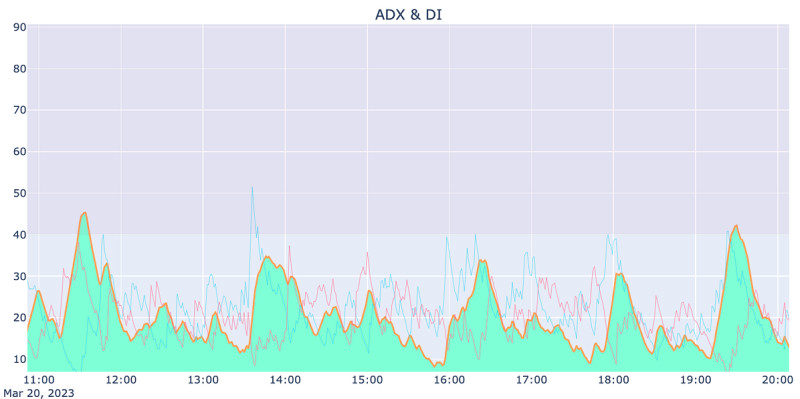
RL works in Atari because the world’s rules don’t change. Bitcoin does.
One source case tested more than 20,000 parameter sets and then used 300 Optuna trials per token, but the developer still called the result overfit and called for walk-forward testing. That is a useful warning. Another guide argues that clean candle bars hide changes in spreads, depth, and order-book state, so it favors quote-level L2 or L3 data for reinforcement learning. Such data can fill terabytes and may be hard to align. More data is not a free fix if it is incomplete or full of leaked future information.
Performance Claims and Failure Modes
The supplied material includes bold figures such as an 82% success rate, 94% trend accuracy, 23% higher profitability, and execution in hundredths of a second. It also says these came from automated systems. Those are claims, not guarantees, and the source gives little proof about the test period, market, account size, drawdown, or fee model. I would not rank platforms on a page that gives you a number but not the test behind it.
Checks for any performance claim
- Ask whether the result came from history, paper trading, or live funds.
- Find the market, asset pairs, period, and sample size behind the number.
- Check whether fees, spread, slippage, and failed orders were included.
- Look for the drawdown and worst loss, not just the return.
- Ask whether a few unusual trades carried the result.
- Find out what the provider means by success, accuracy, or higher profitability.
A bot is not safer simply because it is automated.
If a page uses an what-to-buy list or claims to name the best coin to buy , those words do not prove that a bot is safe. Flash crashes, overfitting, weak data, API theft, outages, and changing markets can all break a good-looking setup. Automation may also make it easier to stop watching a bad position. The bot should be reviewed, not trusted because it runs around the clock.
A Simple Bot Comparison Scorecard
Before I connect live funds, I score each AI crypto trading bot with the same set of questions. That makes the choice less about a shiny AI label and more about fit, proof, and control. I would save the answers, because a sales page can sound very sure right up until the first outage.
Practical comparison scorecard
- Strategy fit: Does the bot support the DCA, grid, signal, arbitrage, copy, or custom strategy I actually plan to use?
- AI role: Does AI place orders, suggest settings, read news, or only follow a schedule? Can I tell the difference?
- Exchange fit: Does it connect to the right spot or futures markets, order types, regions, and price feeds?
- Key safety: Can I limit access, block withdrawals, whitelist an IP, and keep paper and live keys apart?
- Test evidence: Are fees, spread, slippage, out-of-sample data, drawdown, and paper results shown?
- Reliability: Does it report outages, stale data, reconnects, order recovery, and failed scheduled runs?
- Full cost: Do subscription, exchange fees, data, hosting, turnover, and tax tools fit the account?
- Human review: Can I export decisions, set position and cash limits, pause the bot, and read every no-trade choice?
- Custom need: Do I need news logic, a journal, AutoML, reinforcement learning, or a dashboard that a ready-made bot cannot provide?
- Live test path: Can I use demo or paper mode, start small, keep an emergency stop, and review the first result before adding more money?


Comments on “How to Compare AI Crypto Trading Bot Options Before You Invest”
No comments yet. Be the first to share your thoughts.