
How a Cryptocurrency Hardware Wallet Keeps Keys Offline and Signs Transactions
When I explain a cryptocurrency hardware wallet, I start with one correction: it usually does not hold the coins. Your balance and ownership records stay on the blockchain. The device holds private keys, makes signatures, and sends a signed transaction back to your computer or phone. That split is the whole point. It lets you control crypto without leaving the secret key in a file that malware, a thief, or a weak password may reach.
What a Cryptocurrency Wallet Controls
A cryptocurrency wallet is a tool for sending, receiving, and managing digital assets such as Bitcoin and Ethereum. It does not usually place the coins inside a device or file. Instead, it works with the addresses and keys that prove you control an account on the blockchain.
What a wallet handles
- Public addresses used to receive cryptocurrency
- Private keys used to authorize transfers
- Balances and transaction records read from the blockchain
- Unsigned transaction details prepared for approval
- Connections to exchanges, token networks, and decentralized apps
A special, small safe for digital assets.
Public and Private Keys Work as a Pair
A public key works much like an account name. You can share it so someone can send crypto to you. A private key is the secret half of the pair. It can prove control and authorize a transfer, so anyone who gets it may be able to take the linked funds. The key may appear as a long string of letters and numbers, but it is not a normal password you type into a website.
A hardware wallet keeps that private key inside its protected area and uses it to sign a transaction. The signature goes back to the host computer. You can share a public address and blockchain balance may be visible to others, but the private key should stay secret. That is also why using a wallet does not make cryptocurrency anonymous.
Hot Wallets and Cold Wallets
A hot wallet runs on an internet-connected phone, computer, or web service. It is handy for quick spending, but that same connection gives phishing pages, malware, and stolen passwords more room to work. A common setup is to keep only a small amount in a hot wallet and place larger holdings in cold storage.
How common wallet types compare
- Hot wallets connect to the internet for easy access
- Desktop wallets run on a general computer
- Mobile wallets run on a phone or tablet
- Web wallets keep keys on a provider's servers
- Paper wallets print public and private keys on paper
- Hardware wallets keep keys inside a small signing device
That is why people use cold wallets for crypto as a broad name for hardware, paper, and other offline key storage. A cold crypto wallet is defined by where the keys stay, not by its brand or shape.
Custodial and Non-Custodial Wallets
A custodial wallet puts the private keys under the control of an exchange or another provider. Most exchange accounts work this way. You trust that company to protect the keys, return the assets, and process withdrawals. A non-custodial wallet leaves you in charge of the keys and the recovery phrase.
Ask who controls the keys
- Can I recover the account without the provider?
- Who holds the private key?
- Do I need the provider to approve a withdrawal?
- What happens if the provider stops serving me?
Two-factor authentication can protect access to an exchange account, but it does not change who holds the keys. No government, central bank, or insurance company issues and backs a private crypto wallet. With a non-custodial device, the control is yours, and so are the backup and handling duties.
How the Offline Signing Process Works
The private key does not need to travel to the computer. The host device prepares an unsigned transaction and sends it to the hardware wallet. The wallet checks the request, asks you to approve it, signs it with the private key, and returns the signed transaction. The host then publishes it to the blockchain network.
The transaction path, step by step
- The wallet generates or restores private keys and public addresses.
- You share a public address when receiving cryptocurrency.
- The host builds an unsigned transaction with the recipient, amount, and fees.
- The host sends the unsigned transaction to the hardware wallet.
- The device presents the details for your approval.
- The private key signs the transaction inside the device.
- The host publishes the signed transaction to the network.
A built-in screen can help because it gives you a second place to check the recipient, amount, and fees. That matters, but it does not make the host computer harmless. A broken or hacked computer can still build a false transaction or show details that do not match your intent.
A connected wallet interface may also support buying, selling, or swapping crypto. The hardware wallet still acts as the key and signing layer. The phone, computer, exchange, or other network service handles the online connection.
Where Risk Still Remains
Keeping a private key away from the ordinary internet environment can reduce exposure to online attacks. Malware cannot copy the key from the device unless it finds another flaw. That protection depends on correct setup, trusted software, careful approval, and backups that still work when you need them.
Risks that remain after setup
- A seller may supply a counterfeit or modified device
- A pre-set wallet may already belong to someone else
- A thief may find both the device and its recovery phrase
- A stolen device and weak PIN may expose the account
- A bad host may present a deceptive transaction
- The user may approve the wrong recipient address
- Firmware or wallet software may contain a flaw
- The device and every usable backup may be lost
Some product writing claims that hardware wallets make crypto fully private or anonymous. That is too broad. Public addresses and their linked balances can be seen on the blockchain. A hardware wallet can isolate a key, but it cannot hide the public record or approve a bad address for you.
Security is a process, not a product.
Buying and Setting Up the Device
Search pages for hardware wallets for crypto can help you find brands, but a list of hard crypto wallets says little about key design or setup. I would use those pages to find makers, then check the official product instructions. Trezor and Ledger are two examples named in the source material, and the first Trezor Model One launched in 2014.
Buy a new, unopened device directly from the maker when you can. A reseller may sell an opened, changed, counterfeit, or pre-set device. The risk starts before the box reaches you, so a clean setup screen cannot prove the hardware was untouched.
Check before a device arrives
- The seller and shipping source are trustworthy
- The packaging has not been opened or changed
- The exact model supports your coins and networks
- The maker provides clear setup and recovery steps
- The companion app comes from the maker
- The screen shows enough details for each transaction
- The maker has a clear firmware and support process
Initialize the device yourself from a clean state. Never accept recovery words that were selected before the device reached you. In 2017, a reseller reportedly placed counterfeit scratch-off cards in hardware wallet boxes. Each card held words controlled by the scammer and told the buyer to restore the wallet from them. A real-looking prompt is not proof when the seller may control the setup materials.
Attestation can help by checking firmware and a Secure Element, but the source notes gaps in these checks. Use the maker's verification process, review each setup step, and stop if the app or instructions differ from the official process.
Recovery Words and Backup Tests
A recovery phrase, also called a seed phrase or BIP39 phrase, can restore the wallet and its keys on another device. Anyone who learns the words may be able to watch the account and take the funds. In that sense, the phrase is not a note about your backup. It is the secret itself.
A safer backup routine
- Write the words by hand on good, acid-free paper.
- Do not photograph the words or scan them.
- Do not type them into a website or ordinary app.
- Do not place them in email or cloud storage.
- Keep the paper in opaque, tamper-evident packaging.
- Store it somewhere separate from the hardware wallet.
- Keep the device PIN in another place.
- Test the phrase with a spare hardware wallet.
To test recovery, write the words in the order given, enter them into trusted hardware, and confirm that the wallet state comes back. Then wipe the test device. A recovery phrase should only be entered into a trusted wallet during this process, never into a general-purpose computer for safekeeping.
Keep at least one protected backup and test it before you rely on it. No general support desk can rebuild lost private keys from an address or email account. If the device and every usable backup are gone, the funds may be gone too.
The Computer and Multi-Signature System Still Matter
The hardware wallet signs what the host sends it. A general computer may still have malware, fake wallet software, or a changed operating system. That is why the companion app, firmware, and transaction display all form part of the security system. Connecting a safe signer to an unsafe computer is not the same as keeping the key offline by itself.
Safer host practices
- Download wallet software from the maker.
- Check code signing and reproducible build details when offered.
- Use a computer kept free of risky downloads and email.
- Use Secure Boot and disk encryption where possible.
- Check the recipient on the hardware wallet screen.
- Compare the address through a second trusted method.
A multi-signature wallet adds another layer. In an M-of-N setup, M of N keys must approve a transaction. A 2-of-3 wallet, for example, can survive one lost key but not one key plus one backup failure. It can also fail if two required keys are stolen.
For an M-of-N wallet
- Use a separate hardware wallet for each key.
- Store the devices in separate places.
- Keep clear rules for who can approve spending.
- Consider different hardware brands.
- Check the public keys, script, address, and signing threshold.
That last check matters. The source review gives an example where bad desktop software could turn an intended 2-of-3 wallet into a 2-of-5 wallet by adding two attacker-controlled public keys. The device may still hold valid keys while the host builds the wrong wallet rules. Check the full setup on a trusted system.
Choosing a Hardware Wallet for Your Needs
There is no single setup that fits everyone. A small cold wallet may suit a long-term holder, while a frequent trader may want one device for cold storage and a separate hot wallet for daily use. Think about security, cost, ease, supported coins, backup steps, and how much responsibility you want to take on.
When I read a Ledger hardware wallet review, I check the exact model and then move to the maker's own documents. Pages called my Trezor may show one person's setup, while a Trezor Safe 5 vs 7 comparison may help with fit. Use those pages as prompts, not proof. A OneKey secure crypto wallet should face the same checks as any other choice.
Points to compare
- Support for every coin, token, and network you use
- Control of the private key and recovery phrase
- Backup and restore steps
- Screen size and transaction details
- Companion app quality and network support
- Firmware updates and vendor support
- Attestation or another device integrity check
- Open-source or independently checked software
- Physical design, PIN entry, and authentication
- Price and ongoing cost of careful use
Reviews and the maker's track record matter, but a long feature list does not decide the choice. Pick a device you can set up correctly and use for years. If the controls confuse you or the backup path feels vague, keep looking.
Interfaces, Shapes, and Security Features
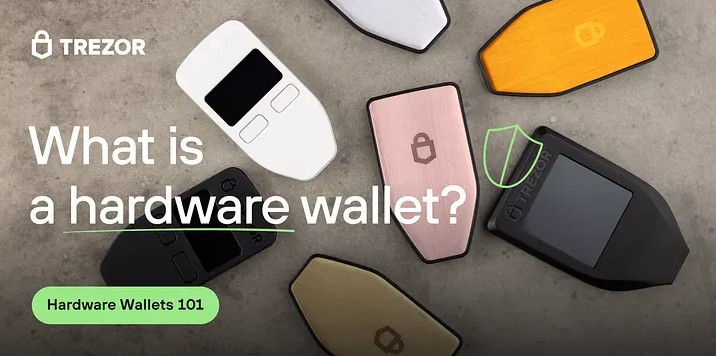
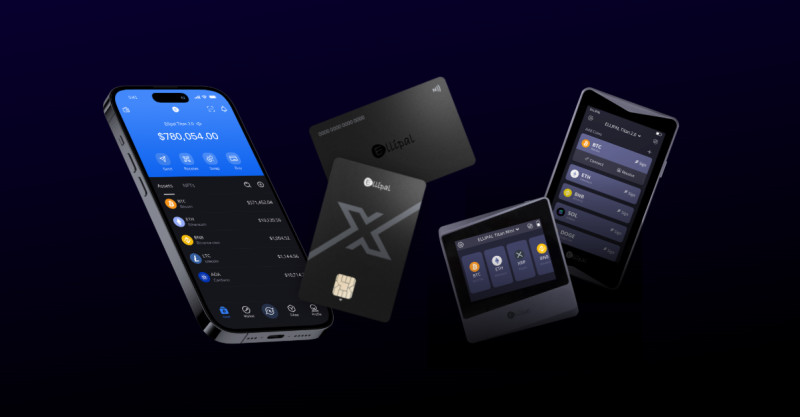
Hardware wallets may look like USB drives, small screens with buttons, or cards. The phrase cryptocurrency wallet hardware is a little clumsy, but the device and its companion software must work as one unit. A device may be sold as cold storage USB , but its shape does not create the security. The key handling, screen, software, and setup do that.
Security features and what they mean
- Two-factor authentication protects an exchange or web account.
- AES-256 encryption is a high standard used to protect data.
- A strong PIN helps against casual physical access.
- Biometrics can add another way to unlock the device.
- A screen helps you check recipients, amounts, and fees.
- Attestation can offer evidence about firmware and hardware.
- Signed software helps you confirm the maker's program.
- HD wallets can create fresh addresses for each payment.
Not every feature is hardware-specific, and not every model has the same tools. HD address generation, for example, is a wallet feature rather than proof of a safe signer. Two-factor authentication helps an online account, while the offline private key remains the main job of the hardware wallet.
The best hardware wallet should be a little bit boring!
Hardware Wallets Compared with Other Storage Choices
A paper wallet can be fully offline, but it can burn, tear, flood, or get typed wrong. A hot wallet is easy to reach but tied to an internet-connected device. A hardware wallet isolates the private key, though it still depends on a host and careful user. There is no magic here, just a different set of risks.
Where each choice fits
- Hot wallets are quick but exposed to online attacks.
- Desktop wallets give key control but depend on the computer.
- Mobile wallets travel well but add phone and theft risk.
- Web wallets are easy to open but depend on a provider.
- Paper wallets stay offline but are easy to damage or mistype.
A small hot wallet can handle everyday payments while a cold wallet holds larger amounts. That split reduces the amount exposed online without forcing every payment through the cold device. Check the address on every transfer, especially when the amount is large.
Exchange Risk and Self-Custody
Many people use exchanges because they make buying, selling, and withdrawing easy. The trade-off is custody. The exchange holds the keys, so account theft, weak access controls, phishing, or a service failure can affect the funds. Years of thefts from custodial services led many users to seek a non-custodial option.
Protect an exchange account
- Use a unique password stored in a password manager.
- Turn on two-factor authentication.
- Protect withdrawals with an extra check when offered.
- Watch for fake support accounts and cloned sites.
- Verify withdrawal addresses before approval.
- Keep only the amount needed for short-term use.
A non-custodial hardware wallet removes the exchange from the custody relationship when you alone control the recovery phrase. It also moves backups, device handling, transaction checks, and software care to you. That is a fair trade for many holders, but it is still a duty.
Everyday Habits and Physical Risks
Security continues after setup. Review firmware notes from the maker, install updates through the official process, and treat an unexpected update prompt or changed setup page as a warning. Use unique passwords, two-factor authentication, antivirus tools, and a firewall on the host. These steps do not replace the hardware wallet, but they reduce other ways into the system.
A steady security routine
- Check the maker's firmware notes before an update.
- Use the official wallet app and support pages.
- Verify each recipient address twice.
- Watch for phishing messages and fake support accounts.
- Keep the recovery phrase away from the device and PIN.
- Store the backup somewhere dry, dark, and secure.
- Keep only a small balance in hot wallets.
- Use separate accounts for separate purposes.
- Do not share a seed phrase with anyone.
- Test recovery before you depend on it.
A stolen device may be vulnerable to a PIN attack, and a thief who also finds the recovery phrase can restore the wallet elsewhere. Paper has its own hazards, including fire, water, disposal, and slow decay. Metal products may help with some paper risks, but the source does not provide enough evidence to call any one product a full answer.
A Recovery and Use Plan
The value of your holdings should shape how much care you take, not how much you hope a device will do for you. A solid plan starts with buying from a trusted source, setting up the device yourself, recording the recovery words offline, and testing them on spare hardware. Then keep the backup separate and use a trusted host for each transaction.
A cryptocurrency hardware wallet checklist
- Choose a model that supports your coins and networks.
- Buy a new device directly from the maker.
- Check the package and setup process for signs of tampering.
- Initialize the device from a clean state yourself.
- Write the recovery words on protected paper.
- Keep the words out of photos, email, and cloud files.
- Test recovery on a spare hardware wallet.
- Store the backup away from the device and PIN.
- Review firmware notes and verify every recipient.
- Keep everyday funds in a hot wallet and larger funds offline.
Comments on “How a cryptocurrency hardware wallet keeps keys offline and signs transactions”
No comments yet. Be the first to share your thoughts.