
How Binance Wallets Move Crypto Between Hot, External, and Extension Wallets
I’ve been digging into how binance wallets handle deposits and withdrawals, and it’s simpler than most people make it out to be. The whole thing boils down to two directions: crypto leaves a Binance hot wallet for an external wallet (that’s a withdrawal), or it comes back from an external wallet to Binance (that’s a deposit). No fancy middlemen, no hidden steps. Just blockchain transparency doing what it’s supposed to do - open, verifiable, and honestly pretty refreshing if you’ve dealt with opaque banking systems.
High transparency is described as a feature of blockchain, not a vulnerability. Transparency can ensure that this new financial system is open to global users and subject to supervision.
When I first started moving coins around, I kept a notebook of every address. Turns out that’s the hard way. The extension wallet changed how I think about key management entirely, and I’ll get to that in a minute. But first, let’s be clear on the basics: a hot wallet lives on the exchange, connected to the internet, ready to move fast. An external wallet? That’s yours - hardware, software, paper, whatever you control. Moving between them is just a withdrawal or deposit, depending on which way the arrow points.
Hot Wallets and External Wallets: The Two-Way Street
Think of the hot wallet as the exchange’s front desk. It’s online, it’s liquid, it processes your trades instantly. But you don’t hold the keys - Binance does. When you want real custody, you withdraw to an external wallet where you hold the seed phrase. That external wallet could be a Ledger, a Trezor, a mobile app, or even the Binance Extension Wallet itself. The mechanism is the same: you initiate a withdrawal from the hot wallet, sign with your external wallet’s address, and the blockchain records the transfer. Reverse it for a deposit.
What makes a withdrawal different from a deposit
- Direction: hot wallet → external = withdrawal
- Direction: external → hot wallet = deposit
- Fees: paid by the sender (usually the hot wallet for withdrawals)
- Confirmation: blockchain confirmations required before funds show up
I’ve seen people confuse this with internal transfers (moving between Binance accounts or sub-accounts). Those don’t touch the blockchain at all - they’re just database entries. Real withdrawals and deposits hit the chain. That distinction matters when you’re tracking funds or troubleshooting a stuck transaction.
The Binance Extension Wallet v1.114 Release
Back in November 2020, the team dropped version 1.114 of the extension wallet. It was verified on both Firefox and Chrome, which matters because browser extensions live or die by their store review process. I remember the download numbers being surprising - 80,000 downloads in that first month alone. That’s not a typo. Eighty thousand people grabbed it in thirty days. For a niche chain wallet, that told me something: folks were hungry for a native way to interact with Binance Chain and Binance Smart Chain without leaving their browser.
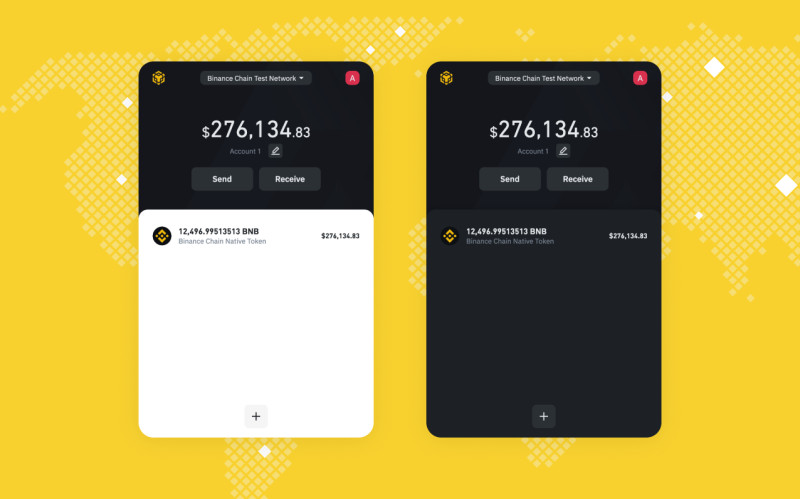
The release wasn’t just a version bump. Performance improvements across the board - faster signing, smoother UI, less lag when switching networks. If you’ve ever clicked “confirm” on a transaction and watched the spinner spin, you know how much that matters. They also fixed a Web3.js 1.2.8 incompatibility that was breaking integration with some DeFi front ends. SushiSwap Classic and Uniswap interface forks could plug right in after the update. That’s the kind of developer experience that actually moves the needle.
Where to Find It and What It Does
You could grab it from the Mozilla Add-ons store for Firefox or the Chrome Web Store. Both links are still floating around in documentation, though I’d always double-check the publisher before installing any extension that touches private keys. The wallet gives you a full Web3 provider in your browser - connect to dApps, sign transactions, manage multiple accounts, all without a separate desktop app. It’s essentially a crypto wallet that lives in your browser , and for daily DeFi use, that convenience is hard to beat.
Extension wallet capabilities
- Create and import accounts from seed phrase
- Switch between Binance Chain and Binance Smart Chain networks
- Sign transactions and messages for dApps
- View token balances and transaction history
- Export private keys per account if needed
One thing I appreciate: it doesn’t try to be everything. No built-in swap, no staking dashboard, no token launcher. It’s a signer and account manager. That focus keeps the attack surface smaller - fewer moving parts, fewer bugs, less chance of a malicious update slipping something in. If you want wallets that do one thing well , this fits that mold.
Hierarchical Deterministic Key Generation Explained
This is where it gets interesting. The extension wallet uses BIP 39 and BIP 32 - standards that have been around for years but are still misunderstood. BIP 39 takes your mnemonic sentence (twelve or twenty-four words) and turns it into a seed. That seed is the root. BIP 32 then lets you derive child keys from that root in a tree structure. You only need to remember the path, not every single key. Hardware wallets have done this forever: Bitcoin at m/44'/0'/0'/0, Ethereum at m/44'/60'/0'/0. The Binance Extension Wallet uses the Ethereum path (44'/60'/0') because Binance Smart Chain is EVM-compatible.
BIP 32 is a specification for creating Hierarchical Deterministic wallets. These wallets can generate multiple child private keys from one root key in a deterministic way. The user only needs to remember the path of the child key rather than store every generated key separately.
Here’s the practical part: every time you hit “Add Account” in the extension, the wallet extends the derivation path with a counter. Account 0, account 1, account 2 - each gets its own private key, all from the same seed. You back up the seed once. That’s it. No more exporting JSON files for every address. No more “which keystore file goes with which account?” It’s deterministic math, and it just works.
Derivation Paths and Why They Matter
The path looks intimidating: m/44'/60'/0'/0/0. But break it down and it’s logical. The "m" is master. 44' means BIP 44 (multi-account hierarchy). 60' is the coin type - 60 for Ethereum, and by extension BSC. 0' is the account index. The next 0 is change (0 for external/receiving, 1 for internal/change addresses). The last 0 is the address index. Change the last number, get a new address. Change the account index, get a whole new account. Same seed, different branches.
Common derivation paths you’ll see
- Bitcoin: m/44'/0'/0'/0/0
- Ethereum and BSC: m/44'/60'/0'/0/0
- Binance Chain (native): uses a different scheme, not BIP 44
- Testnets: often use coin type 1 instead of 60
If you’re importing a seed from another wallet - say MetaMask or a Ledger - matching the derivation path is critical. Wrong path, wrong addresses, funds look missing. They’re not missing; they’re just at a different branch of the tree. I’ve helped friends "lose" funds this way. Always verify the path before panicking.
Web3.js Compatibility and Developer Experience
The v1.114 fix for Web3.js 1.2.8 might sound niche, but it’s a big deal for builders. Web3.js is the main JavaScript library for talking to Ethereum-compatible chains. When a wallet breaks compatibility, every dApp using that library breaks for your users. The release notes pointed to SushiSwap Classic and Uniswap interface forks as examples - both could integrate directly after the fix. That means less custom code, fewer bugs, faster launches.
Forked versions of those repositories could integrate directly with the Binance Extension Wallet.
Basic API docs lived at docs.binance.org. Nothing fancy, just the methods you need: enable, sign, sendTransaction, the usual. For a developer, that’s the signal: here’s the surface area, go build. I’ve seen projects stall because wallet docs were outdated or missing. Having a working reference implementation matters more than people admit.
Community Support and Feedback Loops
They ran a Telegram group - bcextensionwallet - for users and developers. Not a Discord, not a forum, just Telegram. Simple. People asked questions, reported bugs, upvoted feature requests, shared workarounds. That direct line between users and the team is rare. Most projects shove you into a ticket system or a FAQ that hasn’t been updated since 2019. A living chat where a dev might actually reply? That builds trust faster than any audit badge.
What the support group handled
- Getting started guidance for new users
- Troubleshooting connection and signing issues
- Bug reports with reproducible steps
- Feature requests and upvoting
- Product feedback directly to the team
I’ve been in groups where the signal-to-noise ratio tanks fast. This one stayed useful because the scope was narrow: one wallet, two chains, specific use cases. If you’re evaluating wallets for daily use , check their support channels. Active, responsive, technical - that’s a green flag.
Performance Numbers and What They Mean
Eighty thousand downloads in a month. That’s not "market cap" or "TVL" - it’s actual installs. Real people clicking "Add to Chrome" or "Add to Firefox." The performance improvements in v1.114 weren’t marketing fluff either; the gif in the release notes showed side-by-side comparison: old version lagging on account switching, new version instant. That kind of visual proof is rare and appreciated.
Performance in a wallet isn’t about benchmarks. It’s about "did my transaction sign before I got frustrated and closed the tab?" It’s about "can I switch networks without the UI freezing?" Those are the metrics that determine whether someone keeps using your tool or switches to a competitor. The team seemed to understand that.
How This Fits the Broader Wallet Landscape
The extension wallet sits in a specific niche: browser-native, chain-specific, developer-friendly. It’s not trying to replace your hardware wallet for cold storage. It’s not a phone app you carry everywhere . It’s the thing you use when you’re at your desk, interacting with BSC dApps, signing a few transactions a day. For that role, it’s well-designed.
Compare it to something like MetaMask - multi-chain, huge ecosystem, but also heavier and more complex. Or a mobile-only wallet that’s great for payments but clunky for DeFi. Each tool has a job. The Binance Extension Wallet’s job was "make BSC feel native in the browser." Judging by the download velocity and the developer integrations, it did that job.
Practical Takeaways for Anyone Moving Funds
If you’re new to this, here’s what I’d tell myself five years ago: keep your seed phrase offline. Paper, metal, whatever - just not in a cloud note or a screenshot. Use the extension wallet for daily DeFi, but move long-term holdings to a hardware wallet. When you withdraw from Binance, double-check the network (BEP20 vs BEP2 vs ERC20) and the address. A wrong network selection sends funds to a place you can’t easily recover. When you deposit, copy the address from the exchange, not from a chat message or email. Clipboard malware is real.
Quick checklist before you send
- Verify the network matches on both sides
- Confirm the address character by character (first 4, last 4 minimum)
- Send a small test amount first if it’s a new address
- Check gas fees - BSC is cheap, Ethereum mainnet is not
- Wait for confirmations before considering it done
And if you’re wondering where to get coins in the first place , the exchange is still the easiest on-ramp for most people. You deposit fiat, buy the asset, then withdraw to your wallet. The reverse when you want out. It’s not glamorous, but it works.
Security Habits That Actually Matter
All the HD derivation magic in the world doesn’t help if your seed phrase is in a Google Doc. I’ve seen it happen. The math is solid; the human side is the weak link. Write the words down. Store them in two physical locations. Never type them into a website. Never share them with "support" - real support never asks. The extension wallet encrypts your seed locally with a password, but that password only protects the file on disk. If someone gets the seed, the password doesn’t matter.
Whenever “Add Account” was selected in the extension wallet, the seed was extended at the end with a counter value. This made it possible to derive an effectively unlimited number of new addresses automatically within the extension wallet.
That unlimited address generation is convenient, but it also means one seed controls everything. Treat that seed like the master key to a vault - because it is. If you’re managing serious money, a hardware wallet keeps that seed offline entirely. The extension wallet signs with keys derived from the seed, but the seed never leaves the device (or the browser’s encrypted storage). Different threat models, different tools.
Looking at the Bigger Picture
What started as a simple withdrawal/deposit explanation turned into a tour of key derivation, browser extensions, developer tooling, and community dynamics. That’s how it goes in this space - pull one thread, the whole sweater unravels. The Binance Extension Wallet v1.114 was a snapshot in time, but the principles hold: HD keys give you scale, open standards give you interoperability, transparent chains give you verification, and responsive support gives you confidence.
If you’re evaluating different wallet setups or just trying to understand how your funds move, start with the flow: hot wallet ↔ external wallet. Everything else - seed phrases, derivation paths, browser extensions, hardware devices - serves that flow. Master the basics, the advanced stuff becomes manageable. Skip the basics, and no amount of features will save you.
Comments on “How Binance Wallets Move Crypto Between Hot, External, and Extension Wallets”
No comments yet. Be the first to share your thoughts.